
Boat Propeller 4/5: Choosing the Blade Profile (Lift-to-Drag Ratio and Reynolds Number)
Part 1 · Part 2 · Part 3 · Part 4 · Part 5
To choose the profile of a boat propeller blade, we look in the Heliciel profile database for the one with the best lift-to-drag ratio (Cl/Cd) at the Reynolds number of the most heavily loaded blade element. In this fourth part, we read the Reynolds number and the lift-to-drag ratio of the current profile, we browse the database and we apply the best profile to the whole blade.
On this page:
- An already acceptable propeller, and why go further
- Lift-to-drag ratio of a profile, Reynolds number and choice of blade profile
- Reading the Reynolds number of the most loaded blade element
- Choosing and applying a better profile from the database
1: A boat propeller that is already acceptable
We could be satisfied with our propeller. It is close enough to the design brief to be acceptable, and its efficiency of 0.79 is very respectable. A simple edit of the drawings or an export of the 3D model lets us build our prototype.
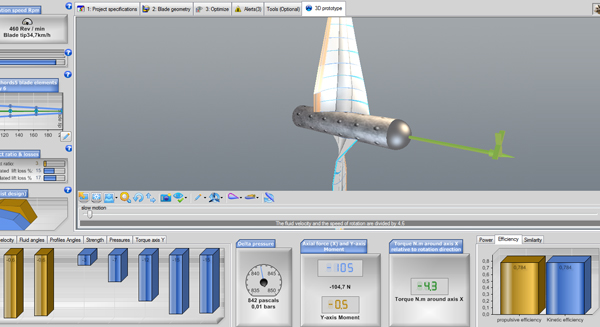
Our propeller at 460 rpm, before choosing the profile: thrust of 105 N and efficiency of about 0.79.
To go further in mastering the design, we now see how to give our blade the best possible profile, and so we enter profile analysis.
2: Lift-to-drag ratio of a profile, Reynolds number and choice of blade profile
A propeller blade is a rotating wing. The lift force of this wing generates the thrust, and its drag force generates the resisting torque that the motor must supply on the propeller shaft. A good profile generates a lot of lift and little drag. It must not cavitate either, but that is another question, which we will come to later.
The quality of a profile is therefore its lift-to-drag ratio = lift / drag, or more exactly:
- Cl (lift coefficient of the 2D profile) / Cd (drag coefficient of the 2D profile). French texts write them Cz and Cx.
The performance of profiles changes with speed. So that profile data stay usable across scales and fluids, they are given as a function of the Reynolds number. A high Reynolds number means a high speed. A profile that performs well at high speed (high Reynolds number) may do less well at low speed (low Reynolds number): it is therefore important to look for the best lift-to-drag ratio at the right Reynolds number.
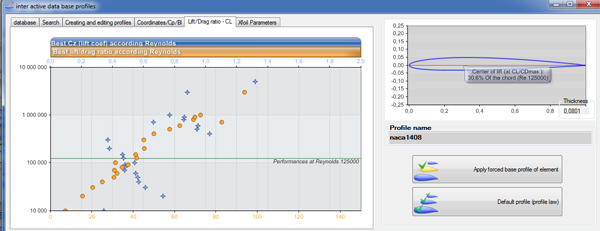
Lift-to-drag ratio and Cl of the naca1408 profile as a function of the Reynolds number in the Heliciel database: performance changes with speed (here, Re = 125,000).
Not all blade elements work with the same efficiency. An element close to the axis provides little lift, because its speed is low. An element at the blade tip generates a lot of lift, but tip losses reduce the efficiency of this lift, unless the blade is fitted with winglets or a shroud that reduces them. In practice, the zone of the blade that provides the most lift is generally around 0.75 times the radius. We therefore have every interest in taking care of this zone and choosing the profile suited to the speed it meets.
3: Reading the Reynolds number of the most loaded blade element
In this tutorial, we chose a constant profile law: the shape of the profile is the same all along the blade. We therefore have to choose the speed, that is the Reynolds number, on which we base the choice of profile. We take the speed of the most efficient blade element: we select the profile that gives the best lift-to-drag ratio at the Reynolds number of that element, then we apply it to the whole blade.
To find this element, we use the thrust chart, which shows which element generates the most thrust.
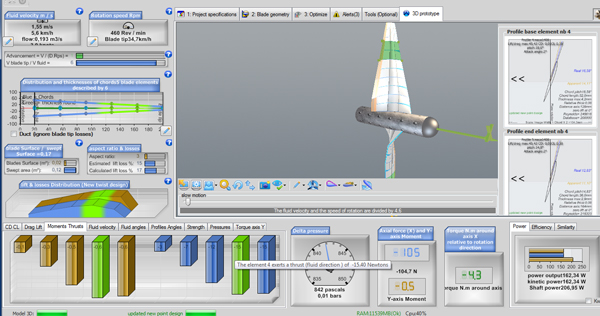
The "Moments Thrusts" tab under the 3D model: the element that provides the greatest thrust stands out clearly. A tooltip gives its thrust in newtons.
We select element 4, which provides the most thrust, by clicking on it in the 3D model. The data of its profile appear in the profile images on the right.
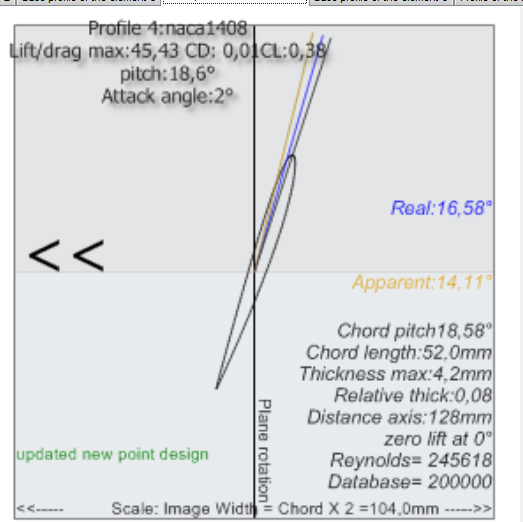
The base profile image of element 4: naca1408, pitch angle 18.6°, attack angle 2°, chord of 52 mm at 128 mm from the axis, Reynolds = 245,619, maximum lift-to-drag ratio 45.43.
- The Reynolds number at the base profile is given: Re = 245,619.
- We also note the lift-to-drag ratio of the current profile, at the top left of the profile image: Lift/drag max: 45.43.
We therefore look for a profile whose lift-to-drag ratio is above 45.43 for a Reynolds number around 200,000. Heliciel shows "Database=200000" on the image: this is the database Reynolds number closest to the actual 245,619. Note that this element 4 lies 128 mm from the axis, that is 0.64 times the 200 mm radius, a little short of the 0.75 radius zone.
4: Choosing and applying the profile with the best lift-to-drag ratio from the database
We display the profile database. Two quick ways exist. The first: by clicking on the blade in the 3D model, the profile of the selected element is displayed; a left click on the element's profile image opens the database.
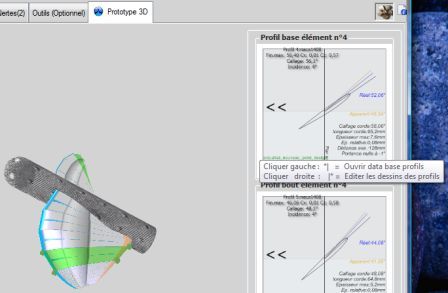
The tooltip shows the left click to open the profile database and the right click to edit the profile drawings (screenshot of the French interface).
The second: in the Windows taskbar, which shows the running applications, the database is always ready to be consulted.
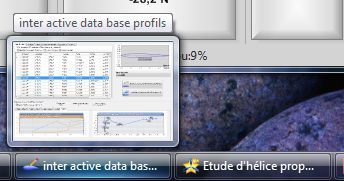
The "inter active data base profils" window in the Windows taskbar.
In the database tab, we sort the list by clicking a column name. We re-sort by clicking the "Re" column header, then we look for a thinner profile whose centre of lift lies as far back as possible. This type of profile spreads its lift over more area and is less prone to cavitation.
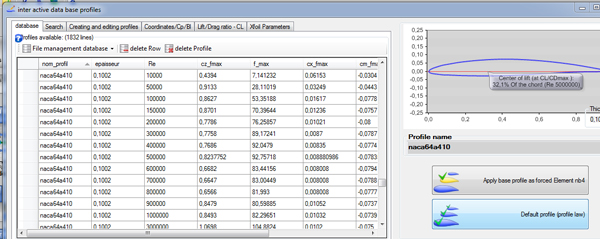
The database grid with the naca64a410 selected. On the right, the profile drawing and the two application buttons, including "Default profile (profile law)".
The naca64a410 profile offers a lift-to-drag ratio of 78.5 and a more stable evolution curve. We choose it as the default profile for all the elements of the blade: we just click Default profile (profile law). The propeller is then rebuilt with the selected profile.
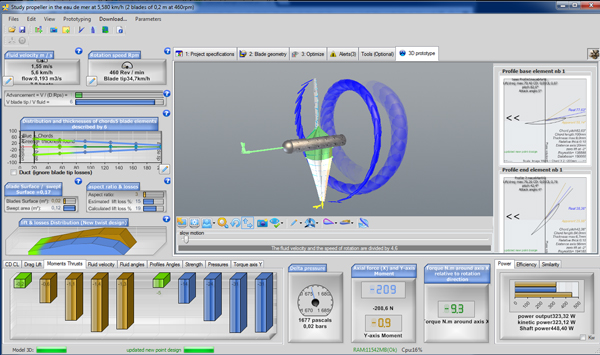
The propeller rebuilt with the naca64a410, still at 460 rpm: the thrust now exceeds 200 N for a shaft power of about 450 W, well beyond our design brief. Part 5 deals with this new gap using the multiple analysis.
To go further, we can adjust the speed with the multiple analysis of the performance, in part 5 of the tutorial.
← Part 3: optimum rotational speed · Part 5: analyzing the performance →
 Global site map
 Mecaflux
 Tutorials Mecaflux Pro3D
 Tutorials Heliciel
 Tutorials Heliciel PRO CFD
 Mecaflux Store
 Compare software functions
 Quotes, Orders, Payment Methods
 project technical studies